Showing posts with label FIRMWARE. Show all posts

Tuesday, January 17, 2012

ARM Processors & Chipsets Visualized


ARM (Advanced RISC Machine) chipset architecture developed by the ARM holdings back in 1987 has been a dominant force in the portable electronics industry. In 2005 about 98% of mobile phones were running on ARM processor and today, in 2012 virtually all Android tablet chipset are based on ARM architecture. The earliest of ARM chipset family was ARM7, while the newest and most powerful ARM Cortex A15. The below lists incorporates various chipset models grouped by chipset families, from oldest family at the top to the newest at the bottom of the list.


The ARM Cortex™-A15 MPCore™ processor is the highest-performance licensable processor the industry. Devices with Cortex A15 to be released in 2013 it will include smartphones, tablets, mobile computing, high-end digital home, servers and wireless infrastructure
ARM Cortex A15 Chipset Models
Texas Instruments OMAP 5430
Texas Instruments OMAP 4470
Texas Instruments OMAP 5432


Available as either a single core or configurable multicore processor, with both synthesizable or hard-macro implementations available. This processor can scale across a wide variety of applications while enabling a consistent software investment across multiple markets.
ARM Cortex A9 Chipset Models
Texas Instruments OMAP 4460
Samsung Exynos 4210
NVIDIA Tegra 250 (Tegra 2)
NVIDIA Tegra 250 3D (Tegra 2 3D)
NVIDIA Tegra 3
Amlogic 8726-M
Apple A5
Renesas EV2
Texas Instruments OMAP 4430 
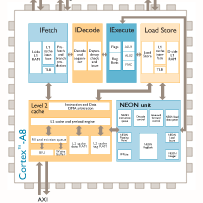
Based on the ARMv7 architecture and has the ability to scale in speed from 600MHz to greater than 1GHz. The Cortex-A8 processor can meet the requirements for power-optimized mobile devices needing operation in less than 300mW; and performance-optimized consumer applications requiring 2000 Dhrystone MIPS
ARM Cortex A8 Chipset Models
Freescale iMX515
Apple A4
Samsung S5PC110
Samsung S5PC100
Texas Instruments OMAP 3430
Freescale iMX535
Rockchip 29xx
Texas Instruments OMAP 3410
Texas Instruments OMAP 3420
Texas Instruments OMAP 3440
Texas Instruments OMAP 3503
Texas Instruments OMAP 3515
Texas Instruments OMAP 3525
Texas Instruments OMAP 3530
Texas Instruments OMAP 3621
Texas Instruments OMAP 3630 

The ARM11™ MPCore™ multicore processor implements the ARM11 microarchitecture and brings multicore scalability with 1 to 4 cores from a single RTL base, enabling simple system design with a single macro to integrate with up to 4x the performance of a single core. The ARM11 MPCore processor brings efficient coherency using built-in SCU, and is supported by a wide range of OS with ARM SMP capability. The processor extends the ARMv6 architecture with PIPT caches, supporting 16KB-64KB L1 caches efficiently.
ARM 11 Chipset Models
Telechips TCC8901
infoTMIC IMAPx220
infoTMIC IMAPx210
infoTMIC IMAPx200
Samsung S3C6410
Samsung S5L8900
Telechips TCC8902

Tuesday, January 10, 2012

How to Update Firmware on WM8650 Tablet & Flytouch DISCO Model

1. Download the firmware folder
2. Extract / Decompress the contents of the folder
3. Open the decompressed folder and copy all of its contents to a formatted micro SD card
4. Turn off the tablet and insert the micro SD into it
5. Power on the tablet
6. Wait until it is 100% upgraded per the status on the screen
7. Remove the SD card
8. WM8650 tablet will automatically restart / Flytouch needs to be powered on in order to restart


If you are looking for the firmware files itself they can be obtained through www.fapoquest.com

How to format an SD card


If you are looking to update the firmware on your Android device the instructions may advise you to "format" a micro SD card before saving the firmware files to it. So how exactly do you format an SD card? It is very simple process that usually takes less than a minute:


Formatting on a Computer
1. Insert the small micro SD card into slot located at the bottom of the the larger SD card adapter. Insert the combination into the computer’s SD card slot
2. Open the "My Computer" 3. Right-click on the drive your micro SD card is inserted into and choose the "Format" option from the menu that appears. Click the "Start" button at the bottom of the "Format" menu.

Formatting With a Cellphone 
1. Insert the Sandisk micro SD card into the card slot on your cellphone. The card slots on some older micro SD enabled phones is behind the phone's battery. Power your phone down before removing the battery.
2. Hit your phone's menu button. In the menu, locate the "Settings" or "Setting and Tools" option. Browse the "Settings" menu for the "Memory" option. 3. Locate the "Card Memory" option from and then choose the format option to erase the SD card.

100% FULL Android Market on generic tablets: WM8650, Flytouch, Zenithink

iPad and Tablet PC industry is one of the fastest growing in the technological world today, with iPad leading the market, Samsung Galaxy, Motorola Droid, and one of the most exciting ones out recently, the Asus Eepad hitting the store shelves. But there is still one BIG problem tablet-wanna-have's face: money. Tablet is still considered more of an entertainment device and spending $600 on games and movies is out of reach for most average consumers. This is where the "generic" tablets manufactured in China come in and save the day. A 7" WM8650 can be purchased for under $100 and 10" Flytouch can be purchased for around $200. Not a shaggy investment.

Thousands of consumers went shopping during the Christmas season and purchased WM8650, Flytouch, Zenithink, and other generic tablets for themselves, friends and loved ones. To their big disappointment they received a tablet and realized that it does not connect to wifi properly, drains battery fast, and most importantly does not have a FULL Android market. If this is the case with you please visit fapoquest.com to obtain a firmware that fixes most of these issues. Once you install the firmware you may still experience issues locating applications like Skype, Angry Birds, Google Maps, and other on the Android market. This is because of the cache issue with Android market and here are the steps to fix it:


1. Open the Market and press the home button to return
2. Go to Settings \ Applications \ Manage \ Running
3. Press "Market"
4. Press "Clear cache" (do not clear data)
5. Press "Force stop"
6. Return to "Settings \ Applications \ Manage \ Running"
7. Press "Google Services Framework"
8. Press "Clear Data"
9. Press "Force Stop"
10. Start Google Market, it must give an error
11. Reboot, once back Market should work, if it gives an error it could need another minute to work
12. Test the access, search Skype, Angry Birds on the market, it should return 400+ results including the original Skype and google's apps like maps / streetview / docs

Tuesday, August 2, 2011

Latest Flytouch 3 Firmware

Procedure:
  1. Download the firmware & save to micro SD card
  2. While the tablet is off insert the micro SD card
  3. Turn it on and wait for it to update
  4. Status on the screen will show the progress
  5. Once done updating the tablet will automatically shut down
  6. Remove the SD card & turn it back on!
  7. You are done!
Flytouch Firmware, credit goes to developer Tim. To download click:
http://www.4shared.com/file/UdbG-UiL/firmware-discovery.html
http://www.4shared.com/file/5NReQ1bq/firmware2.html

 
Design by Free WordPress Themes | Bloggerized by Lasantha - Premium Blogger Themes | cheap international voip calls