Showing posts with label NEWS. Show all posts

Thursday, January 26, 2012

Which is Better: Android 4.0 or iOS5


Android 4.0 or the Ice Cream Sandwich is the new operating system released by Google at the start of 2012. There is a lot of buzz around whether Android 4.0 is a strong rival of iOS5 and if the changes it brought over Android 3.0 are significant enough to pursue upgrading. When it comes to Android vs. iOS comparison it becomes tricky to identify which factors are more important in evaluation.  And frequently, user decisions are closely based on hardware prices, phone contracts, and personal preferences as opposed to the actual quality of the operating system. Nevertheless, I will attempt to highlight the Android 4.0 Operating System features and put it in context by comparison to the iOS.

Ease of Access
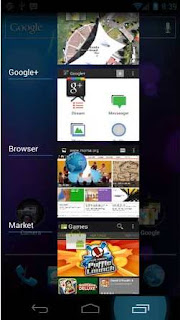
ANDROID: Android 4.0 brought several changes to how the user interacts with home screen, menu, notifications, apps, and widgets. The biggest advantage of Android 4.0 when it comes to layout is the ease of access to the applications and widgets user needs the most. With the previous versions you were able to long press frequently used application to drag it to the home screen. Android 4.0 now has a separate menu for widgets in addition to apps that user can drag to the home screen and even resize. The most recent applications can be quickly navigated to at one push of a button. This allows for greater multitasking functionality.
iOS:  When it comes to layout Apple opts for simplicity. The majority of tech owners, whether having and iPhone or not do know how iPhone operates. Although there are many great features developed by Apple over the years its iPhone layout has not changed in a significant way. I must applaud to Android 4.0 for thinking about user interaction and adding features such as Recent Apps button that its rival is currently lacking.
Pulpit rock

Application Folders
ANDROID: One of the nice features brought with Android 4.0 is the ability to group applications by simply dragging them “inside” each other. This allows user to quickly identify the app they need and remembering which screen the app folder is placed at. With over 250,000 apps available on the Android market it will be difficult to resist the temptation of downloading so many apps that you might get lost inside your own phone. So having folders for quick identification is definitely a value-adding feature.


iOS: This is one of the features Google borrowed from its rival as iPhones and iPads had the ability to file applications by dragging them “inside” each other for quite awhile now.

Google Maps Navigation


ANDROID: This is not a new feature to Android 4.0 but still one worth highlighting. Google Maps on Android devices have a voice turn-by-turn navigation feature which eliminates the need of installing a third party GPS application.

iOS: It has Google Maps but unfortunately turn-by-turn navigation is something it is currently lacking.

Two Column Layout


ANDROID: A feature that makes the device easier to use contributes to the overall experience and thus improves the quality of the operating system. Android 4.0 brought the feature of 2-column layout for viewing the Settings menu and various applications like gmail. What 2-column layout basically does is utilizes the screen space more efficiently by placing menu titles on the left hand column and detailed description on the right hand column. So the user is able to quickly preview all of the settings features without having to hit the back button again and again. The same feature was applied to gmail outlook where the email subjectlines appear on the left head column and message preview on the right. This allows for quick navigation of some of the important and most used features on a phone or tablet.
iOS: So far iOS has the traditional functionality when it comes to layout of the settings menu where the user clicks on the settings function to be taken to the next screen for detail. Props to Android for integrating a better layout functionality.

Google Wallet
ANDROID: This new feature depends as much on the hardware as it does on software, allowing users to submit a payment simply by waving their phone over the sensor. Because of the current restrictions with participating phones and payment partners most of the Android users have not had the chance to enjoy this feature. But nevertheless, it is something to watch out for in the future as payments via portable devices are on a fast uphill trend.


iOS: Currently the iOS 5 is lacking this functionality but it is certainly something to look forward to in the future

Photo Editing


ANDROID: Amongst all other things, Android 4.0 brought better photo editing functionality that is native to the system. User is now able to quickly perform tasks such as crop, red eye removal, rotate, resize, and various "hipster" picture effects. 
iOS: Allows basic photo editing as well as picture enhancement straight through the system itself without involving any third party apps, so no significant differences from Android 4.0 on that front. 


Android Beam
ANDROID: Similar to Google Wallet, this feature works on NFC-enabled devices only. With just one click of a button it enables users with Near-Field-Communication-Enabled devices to quickly send and receive favorite apps, contacts, music, and videos.

iOS: iOS5 does have something similar called the iCloud however it works in a different way by allowing user to quickly sync its photos, apps, and music to the Mac or PC wirelessly. Through activating iCloud account user is even able to find its lost phone by locating it via iCloud.com through another device. So this is where it comes down to personal preferences on wireless sharing with the two different platforms. Some prefer what iCoud has to offer while other users find Android Beam fits their needs a bit better. 

Hardware Screenshot Button


ANDROID: With Android 4.0 users can now take screenshot using the hardware button. They can later edit the screenshot using the picture editor integrated into the Android 4.0 native system. 

iOS: Hardware screenshot button functionality has been on iOS for quite awhile, it is middle button + power button pressed together

___________________________

To Buy or Not to Buy?
Although there are no groundbreaking features brought with Android 4.0 besides better, faster, and easier it is an operating system with a lot of potential and we are yet to see how various phone manufacturers are going to customize and utilize it to their advantage. In my personal opinion iOS is a stable trusted and respected system. Apple sets the benchmark for the rest of the portable touchscreen devices. But with the release of the latest Android 4.0 System we begin wondering how long that market leadership is going to last. Phone and tablet manufacturers are slowly learning on their mistakes and produce higher quality devices and more integrated with the Android firmware. Android 4.0 device is without a question worth investing into especially if Android Phone is your preferred method of communication. 

Saturday, October 1, 2011

iPhone 4S Siri, but what about Google Voice Commands for Android?


Today marks the announcement of iPhone 4S, not iPhone 5 as everyone was expecting. Sure there were a lot of sources that said iPhone 4S is a 90% possibility, but as a consumer we didn't want to accept that fact. We all hoped for something bigger, and more than just 1 single button on the screen to click on. But what did we get in return?


Sure many of consumers were disappointed as they were expecting more than just a few features that it brings to the table. For example, the 8MP-camera-with-a-new-lens added for better resolution.


The iCloud is a new functionality, which had already existed, but now it is all exclusive on the new iPhone 4S. But most of this was all predicted.


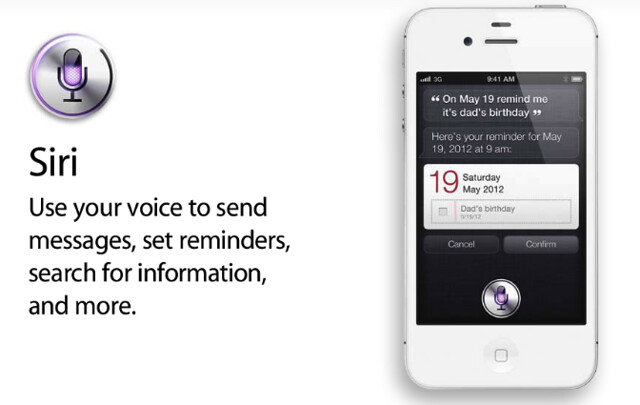
One thing that was stressed heavily on iPhone 4S is Siri. Your wish is its command.

It is known to read and understand your commands without using your keyboard or touch screen. It is the most advanced system, which has put iPhone 4S a few years ahead of its competitors. Because of this, now you never really have to touch your screen to take care of daily tasks, except when you really want to interact with your phone off course for browsing, games, and such.

This pretty much sums up what the whole iPhone 4S is about apart from the A5 chip processor.


...BUT, how much of this new technology "per se" would you be utilizing?


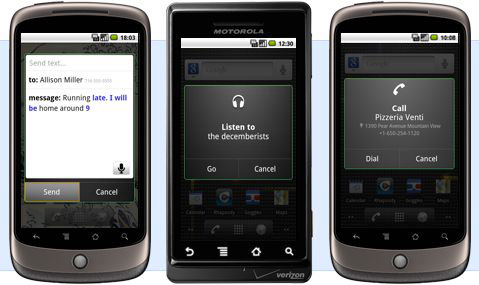
By now, everyone has heard of Google Voice Commands for Android phones.


It was quite possibly the most advanced voice activated technology on smart phones for consumers to use while driving or who just want to be hands free.


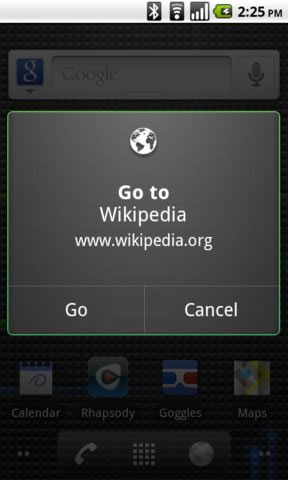
Most of us who have used Android Smart Phones have utilized the Google Voice Commands to an extent. But even though there is so much more it has to offer, we as consumers never really used it to its full potential. Why is that? What is the reason for this? Simple, we like to have interaction with our phone. We find it simple to grab the phone and get to what we want with it without any extra work. The phones nowadays have fast processors inside of it, which leads us to navigate through the phone quicker. Hence, we never really used the Google Voice Commands as much.


So to sum it all up, yes the technology is impressive even though there is some disappointment about the hardware itself. However, an average consumer would never be able to find themselves at a a high comfort level using SIRI as they have other options available. 

Tuesday, July 26, 2011

T-Mobile G2x updated finally comes around, BUT not worth downloading yet.

Finally, after a long wait, we have the update that we waited for over a month. The T-Mobile G2x phones get the update through the LG website. BUT, there is a situation now, as Mike would say from Jersey Shore. After speaking with the LG representative over chat, we were told the update is available, but not something you want to download as of now. After investigating a bit more, we found out that the Android 2.3 is still having problems. A lot of customers called LG support team complaining about these issued aligned below:

-Phone is stuck on update screen.
-It automatically booted off and won't turn on.
-Stuck on the logo screen.

Now we're not sure how many more issues the update is bringing along as of now, but the LG representative clearly stated to wait a few days before downloading the update.

It's sad that after a long due wait, we face an update that is yet again, disappointing. Do we blame LG for this? Perhaps, but I think it is time for the company to make an official statement apologizing for lowering the image they want us to perceive of their company.

Sunday, July 17, 2011

8" Android 2.3 Samsung S5PV210 Tablet

The next generation of Android Touch PC's built on the latest and greatest Android 2.2 OS. "Touch" through books, magazines, and newspapers on this revolutionary device's crystal-clear, full-color, 8-inch display. Download and read over 2 million eBooks in a light and convenient package. At just under one pound, the 0.6-inch-thick 8" Samsung S5PV210 goes everywhere you do and fits perfectly in one hand. Staying up-to-date with email and social networks is just a Wi-Fi hotspot away, thanks to the Touch's 802.11 b/g Wi-Fi and full browser support. You can even load your Touch up with all your favorite music and movies. The 8" Samsung S5PV210 comes with 4GB internal storage with expandable storage capacity up to 32GB. Don't worry about speed as the 8" Samsung S5PV210 comes stocked with 1.2GHz speedy processor and 512 MB of DDR RAM making it one of the fastest Tablets on the market.


Full-Color 8" Touch Display
The 8" Samsung S5PV210 features a eight-inch (diagonal) touchscreen with 800 x 600 pixel resolution, ideal for viewing eBooks and eMagazines, Web pages, and movies. The built-in G-SENSOR, tilt-activated rotatator will flip the page display from portrait to landscape and back when you turn the device.
Android 2.2
The 8" Samsung S5PV210 is built using the Android 2.2 OS, an easy-to-use, powerful, and reliable operating system from the team at Google. Designed for touchscreen devices like the 8" Samsung S5PV210, Android helps you easily manage your programs with a vastly intuitive interface. The biggest difference in the new Android 2.2 is the support of Flash based websites allowing you watch the latest technologies on your tablet on the go. With the true 1.2MHz processor, the 8" Samsung S5PV210 will have no problem upgrading to the new Android 2.3 Gingerbread early next quarter.
eBook Reader
Pack dozens of books for a weeklong getaway without weighing down your suitcase. The Android Market provides eBook content, and is a one-stop shop for downloading apps and videos from a broad array of content and providers, all in one market. Support is provided for ePub, PDF, TXT, PDB, and HTML reader files.
Enjoy Your Other Media Includes Built-in HDMI
Bring your favorite movies on a plane without the hassle of a portable DVD player or laptop, with support for AVI, DIVX, MPEG-4, DivX, Xvid, and H.264 video formats. Listen to your favorite tunes in MP3, WMA, AAC, or WAV formats. Or share pictures from your last vacation with JPEG, GIF, PNG, and BMP support. Dont' forget about HDMI output for 1080p High Definition vieing on your TV, Plasma, or LCD.
Stay Connected with 802.11 b/g Wi-Fi as well as 3G & 4G optional upgrades.
Put the power of the Internet right in your hands. Stay connected with email and social networks like Facebook, YouTube, MySpace, Twitter, even while on the road. Download remarkable content, astonishing applications, and amazing games. The 8" Samsung S5PV210 also supports 3G / 4G (WCDMA/TDSCDMA/EVDO/WIMAX) with a supported adapter sold seperately.
Add Storage Capacity
The 8" Samsung S5PV210 offers 4GB internal storage, expandable via both USB and SD card slots.
Built-in Microphone, Speaker, and Built-In Camera
8" Samsung S5PV210 comes equpped with a built-in microphone that supports audio recording, and live chat. The 8" Samsung S5PV210 delivers great audio with a built-in speakers and comes with a pair of earphones as well. And to top it all off, the Elite packs a front facing 2MP Camera allowing you to snap pictures on the run, conduct video chat, and much more.
Built-in Applications
The 8" Samsung S5PV210 includes a built-in calendar, alarm clock, contacts, games, Gmail, YouTube, and other useful apps. Browse the Android Market right on your 8" Samsung S5PV210 and download from 1,000s of application and games on the Android Market.

 
Design by Free WordPress Themes | Bloggerized by Lasantha - Premium Blogger Themes | cheap international voip calls